How I Structure My Filament Projects Today
A pragmatic look at how I structure my Filament projects after several years working with Laravel. No over-engineering, just a simple setup that helps me move fast and stay efficient.


I’ve been working with Laravel for several years now, and around 3 years with Filament. Today, most of my client projects use Filament for backend management, and sometimes for frontend components using Livewire.
Over time, I’ve developed a simple and pragmatic way to structure my Filament projects. It’s not necessarily the best approach, but it’s the one that allows me to move fast and stay efficient.
Starting Point
I almost always start from one of my two templates:
- Laravel Filament Backend Starter (for simple backends)
- Laravel Filament Multi Panel Starter (when multiple panels are needed)
I’m not covering multi-tenancy here, as I’ve only worked on one such project so far. It would be close to the multi-panel setup, but I haven’t industrialized it enough yet to publish it.
These starters allow me to begin with a solid base that already includes:
- Authentication + optional 2FA
- Queue management with Laravel Horizon, to easily monitor jobs from the backend
- Log management with Log Viewer, accessible from the backend
- Roles and permissions with Spatie Laravel Permission
- Password expiration handling with my own package Filament Renew Password (useful for projects in France where clients often require periodic password changes)
- Pest for unit and feature testing
- Laravel Debugbar for development
- Pint for code style
- PHPStan for static analysis
Project Structure
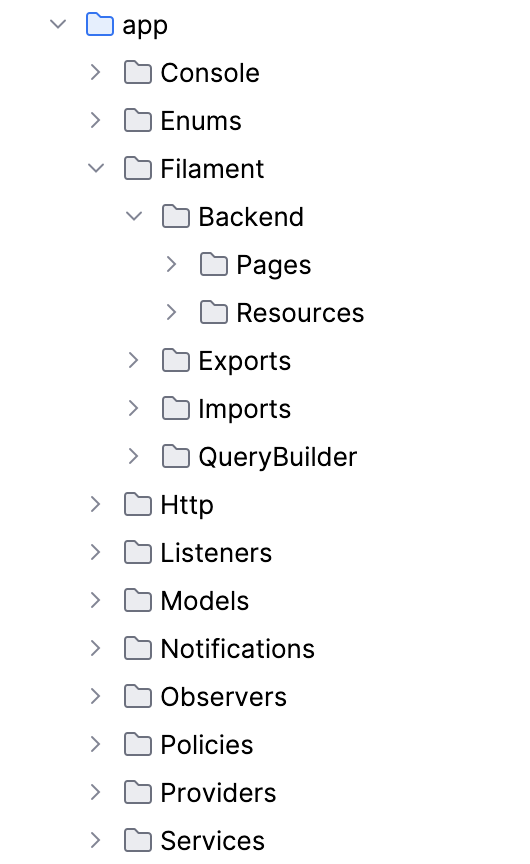
For project structure, I stick to Filament’s default organization.
I typically:
- create a subfolder per panel
- add a
sharedfolder for reusable schemas if I have some panels with shared components (Tables, Forms, etc.)
I don’t always extract schemas into dedicated shared folder. Sometimes I keep them directly inside resource folders and refactor later if needed.
Over-optimization can hurt efficiency 😄
I work with PHPStorm, and usually host my code on my personal GitLab with a CI/CD pipeline (including SAST, secret detection, Composer & NPM audit, container scanning, etc.). I might share some of these resources in a future article.

Architecture Choices
For larger projects with a more complex roadmap, I usually introduce a Service layer to centralize business logic.
I’ve experimented with more advanced patterns like Domain-Driven Design or hexagonal architecture. However, in most real-world projects I’ve worked on, these approaches added complexity without bringing significant long-term value.
Today, I prefer to keep things simple and refactor when necessary.
In some cases, I add a Repository layer on top of Services, but I feel it often reduces the power and simplicity of Eloquent while adding an unnecessary layer.
Additional Tools
With this setup, I already have a strong foundation that saves me a lot of time when starting a project.
Depending on the needs, I then add specific packages such as:
- Laravel Excel for advanced Excel exports, often combined with Filament’s export system
- Laravel Socialite for authentication with client providers (SAML v2, Google, etc.)
- Spatie Laravel Activity Log for user activity tracking, sometimes extended with timestamping and hashing for audit purposes
- Some filesystem libraries like
league/flysystem-sftp-v3for SFTP file transfers
Conclusion
Over time, I’ve realized that what matters most is not having a perfect architecture from day one, but having a simple foundation that allows you to move forward quickly.
Today, I tend to prioritize simplicity and efficiency, improving things along the way when needed.
Feel free to let me know in the comments if this kind of article is useful. It’s a bit different from what I’ve shared so far on Filament Mastery.