Improve Filament Import UX with Persistent Error CSV Downloads
Filament’s import feature is powerful but limited when it comes to accessing error files after the process completes. In this article, learn how to build a simple import history system, proper authorization using policies, and a clean Filament resource for better team workflows.


By default, FilamentPHP provides a convenient import action with built-in feedback once the process is complete.
After an import finishes, a notification is displayed showing the result, along with a link to download a CSV file containing failed rows.
While this works well for simple use cases, it quickly becomes limiting in real-world applications:
- Only the user who initiated the import can access the error file
- The download link disappears once the notification is dismissed
- There is no built-in way to view past imports or retry analysis
👉 In a team environment, this can become frustrating very quickly.
In this article, we'll implement a simple and clean solution to:
- List all imports in a Filament resource
- Allow authorized users to download error CSV files
- Manage and delete past imports
Understanding Filament's Default Behavior
Filament already provides an internal model to handle imports:
Filament\Actions\Imports\Models\ImportThis model includes several useful attributes:
completed_at→ timestampprocessed_rows→ integertotal_rows→ integersuccessful_rows→ integer
It also exposes computed values like:
$import->getFailedRowsCount()Filament also defines an internal route used to download failed rows:
Route::get('/imports/{import}/failed-rows/download', DownloadImportFailureCsv::class)
    ->name('imports.failed-rows.download');
You don't need to override this route, we'll simply control access to it.
The Access Problem
By default, if no Policy is defined, Filament restricts access like this:
$importPolicy = Gate::getPolicyFor($import::class);

if (filled($importPolicy) && method_exists($importPolicy, 'view')) {
    Gate::forUser($user)->authorize('view', Arr::wrap($import));
} else {
    abort_unless($import->user()->is($user), 403);
}
Extract of Filament\Actions\Imports\Http\Controllers\DownloadImportFailureCsv Controller
This means:
- If no policy exists → only the owner can download the file
- If a policy exists → Filament defers authorization to it
So the solution is simple: define a Policy.
Creating the Import Policy
Generate the policy:
php artisan make:policy ImportPolicy --model="Filament\Actions\Imports\Models\Import"Here is an example implementation:
namespace App\Policies;

use App\Enums\ImportImporterEnum;
use App\Enums\PermissionEnum;
use App\Models\User;
use App\Services\PermissionService;
use Filament\Actions\Imports\Models\Import;
use Illuminate\Auth\Access\HandlesAuthorization;

class ImportPolicy
{
    use HandlesAuthorization;

    public function __construct(protected PermissionService $permissionService) {}

    public function viewAny(User $user): bool
    {
        return $user->hasPermissionTo($this->permissionService->getPermissionName(PermissionEnum::VIEW_ANY, Import::class));
    }

    public function view(User $user, Import $import): bool
    {
        if (is_null($import->completed_at) || $import->getFailedRowsCount() == 0) {
            return false;
        }

        return $user->hasPermissionTo($this->permissionService->getPermissionName(PermissionEnum::VIEW, Import::class));
    }

    public function delete(User $user, Import $import): bool
    {
        if ($import->importer == ImportImporterEnum::PRODUCT_MAPPING->value) {
            return false;
        }

        return $user->hasPermissionTo($this->permissionService->getPermissionName(PermissionEnum::DELETE, Import::class));
    }
}
In this example, permissions are handled using a role/permission system (e.g. Spatie Laravel Permission) with a own Permission Service and Enum. Adapt this logic to your own application.
Ideally, Filament would use a dedicateddownloadmethod instead ofview, as these represent different concerns. However, we'll stick with the default behavior for simplicity.
Registering the Policy
Don't forget to register the policy in your service provider:
use Filament\Actions\Imports\Models\Import;

public function boot(): void
{
    Gate::policy(Import::class, ImportPolicy::class);
    ...
}
Creating the Filament Resource
Now let’s expose imports in the admin panel:
php artisan make:filament-resource Import --model-namespace=Filament\\Actions\\Imports\\ModelsWe don’t need forms here, only a listing page. So you can delete Schemas format and some pages like CreateImport and EditImport
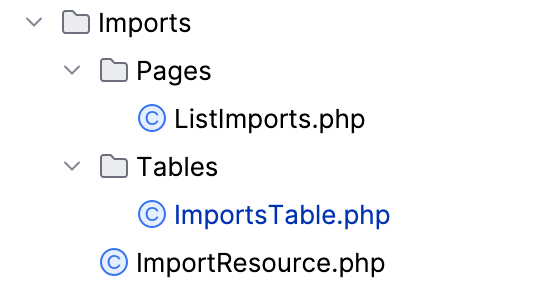
Resource class
class ImportResource extends Resource
{
    protected static ?string $model = Import::class;

    public static function table(Table $table): Table
    {
        return ImportsTable::configure($table);
    }

    public static function getPages(): array
    {
        return [
            'index' => ListImports::route('/'),
        ];
    }
}
Simplified Import Resource
Building the Imports Table
Here's a simplified version of the table:
class ImportsTable
{
    public static function configure(Table $table): Table
    {
        return $table
            ->columns([
                TextColumn::make('file_name')->searchable(),
                TextColumn::make('importer'),
                TextColumn::make('user.name'),
                TextColumn::make('total_rows')->numeric(),
                TextColumn::make('processed_rows')->numeric(),
                TextColumn::make('successful_rows')->numeric(),
                TextColumn::make('completed_at')->sortable(),
            ])
            ->recordActions([
                ActionGroup::make([
                    Action::make('downloadFailedRowsCsv')
                        ->label('Download errors')
                        ->color('warning')
                        ->icon(Heroicon::ArrowDownCircle)
                        ->url(fn (Import $import) => URL::signedRoute('filament.imports.failed-rows.download', ['authGuard' => filament()->getAuthGuard(), 'import' => $import], absolute: false), shouldOpenInNewTab: true)
                        ->authorize('view'),

                    DeleteAction::make(),
                ]),
            ])
            ->defaultSort('created_at', 'desc');
    }
}
Simplified ImportsTable
Key Feature: Downloading Failed Rows
The most important part is this action:
Action::make('downloadFailedRowsCsv')It:
- Uses Filament's internal signed route
- Relies on the
viewpolicy for authorization
👉 Combined with the policy, this ensures:
- Only authorized users can access error files
- Downloads remain secure
- UX is significantly improved
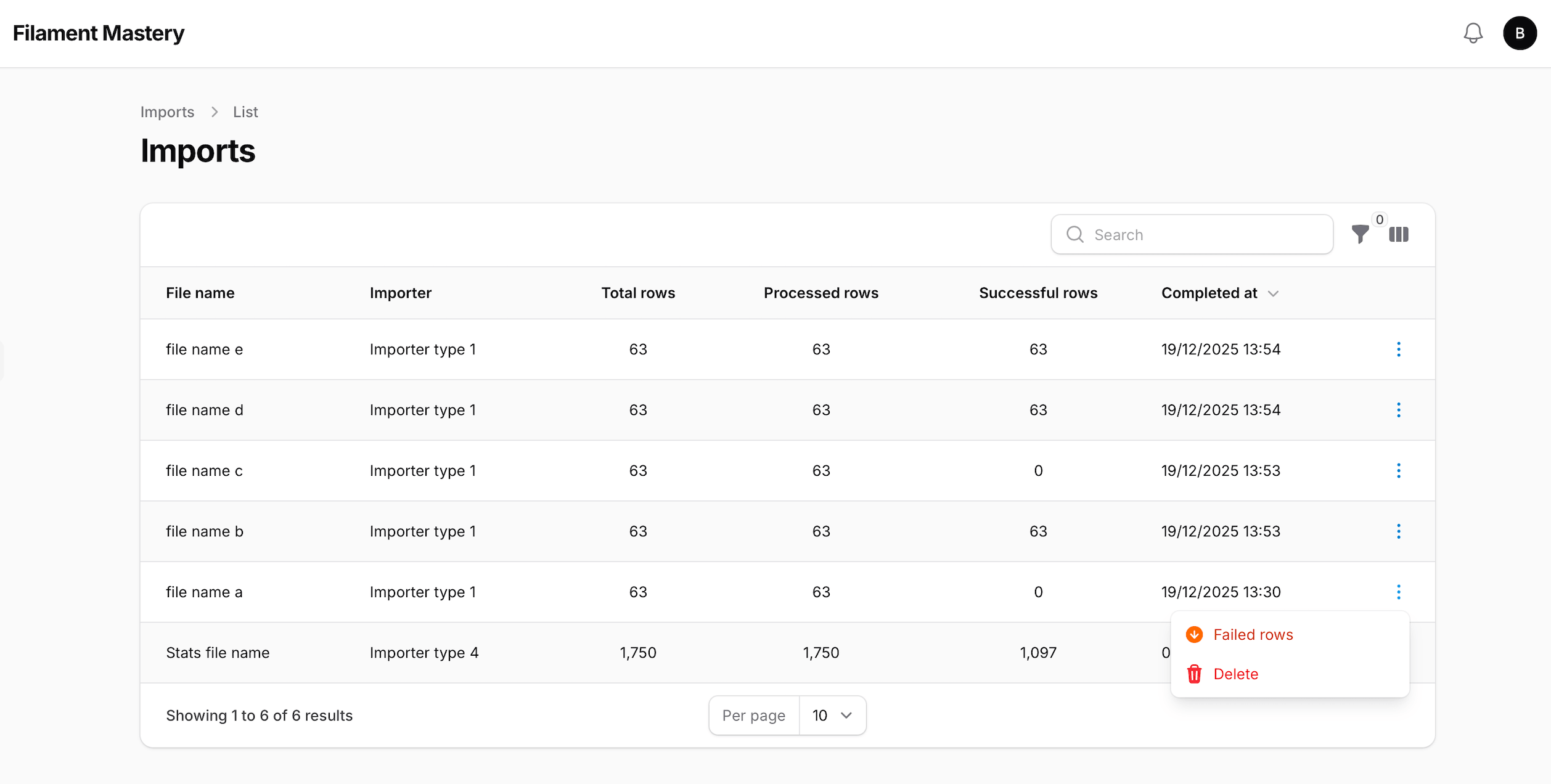
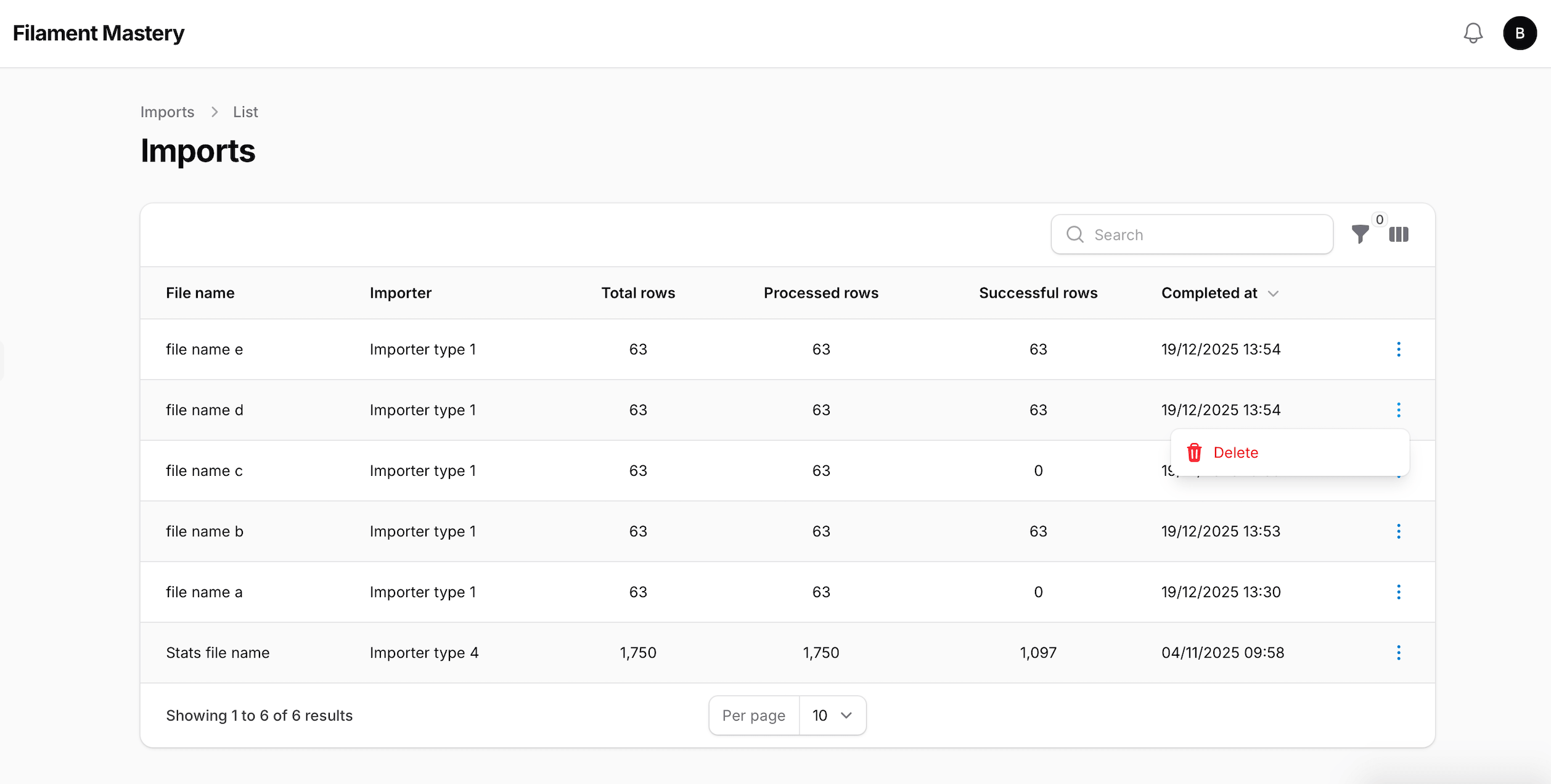
Final Result
With just a Policy and a Resource, you now have:
- A complete history of imports
- Persistent access to error CSV files
- Team-friendly access control
- A cleaner and more professional admin experience
Conclusion
Filament provides powerful building blocks, but some features, like import history, require a bit of customization to fully shine.
With this approach, you enhance both usability and maintainability without adding unnecessary complexity.
From here, you could go further by adding:
- Retry mechanisms
- Import status filters
- etc.
🚀 Want to go further?
I’m sharing production-ready Laravel & Filament setups (Docker, CI/CD, deployment…).